Parallels Desktop Business Edition 14.1.2 (macOS) โปรแกรมจำลอง Windows บน Mac ฟรี
ดาวน์โหลด โปรแกรม Parallels Desktop Business Edition 14.1.2-45485 โปรแกรมจำลอง Windows บน Mac ฟรี
ดาวน์โหลด Parallels Desktop Business Edition 14 ล่าสุด (macOS) โปรแกรมจำลอง Windows บน Mac ฟรี
Parallels Desktop Business Edition 14 เป็นโปรแกรมจำลอง Windows บน Mac (Macintosh) สามารถรันระบบปฏิบัติการอื่น ๆ ไปพร้อม ๆ กับ macOS ได้ โดยโปรแกรมนี้จะคล้ายกับโปรแกรม VMware (วีเอ็มแวร์) ของ Windows นั่นเอง
Parallels Desktop for Mac พัฒนาเพื่อรองรับการติดตั้ง Windows 10 ได้ สามารถตั้งค่าการแบ่งหน่วยความจำไปยังส่วนของการใช้งานวินโดว์ได้อีกด้วย ด้วยคุณสมบัติเจ๋ง ๆ นับร้อยและเครื่องมือเพิ่มเติมสำหรับการใช้งานทั้งบน Mac และ Windows มาพร้อมกับอินเทอร์เฟซที่เรียบง่าย พร้อมด้วยเครื่องมือและฟังก์ชั่นในการใช้งานที่มีประสิทธิภาพมากมาย
Supported Operating Systems for virtual machines :
- Windows 10
- Windows 8.1
- Windows 8
- Windows Server 2012 R2
- Windows 7 (SP0-SP1)
- Windows Server 2008 R2 (SP0-SP2)
- Windows Vista Home, Business, Ultimate, Enterprise (SP0-SP2)
- Windows Server 2003 R2 (SP0-SP2)
- Windows XP (SP0-SP3)
- See Full OS Supported List
คุณสมบัติเด่น (Key Features)
- Runs Faster – Start Windows and applications up to 35% faster.
- Saves Space – Get up to 20 GB back with automatic disk monitoring.
- Easily Monitors – Instantly view and monitor CPU and RAM usage.
- Optimizes Memory – Automatic adjustment of video memory for best performance.
- New macOS – Optimized for macOS® Mojave including Dark Mode.
- Free up More Disk Space.
- Graphics Improvements
- Touch Bar
- Performance Boosts
- Up to 35% faster starting Windows and applications
- 2x performance improvements with AVX512 support
- Suspend on APFS formatted disks is up to 30% faster
- Start Parallels Desktop up to 80% faster
- Snapshots in Parallels Desktop 14 take up to 15% less disk space
- The lightest, fastest Parallels Desktop release yet!
- Shared Pressure Sensitivity
- Shared Camera
- Multi-Monitor
- Video Memory
- And more.
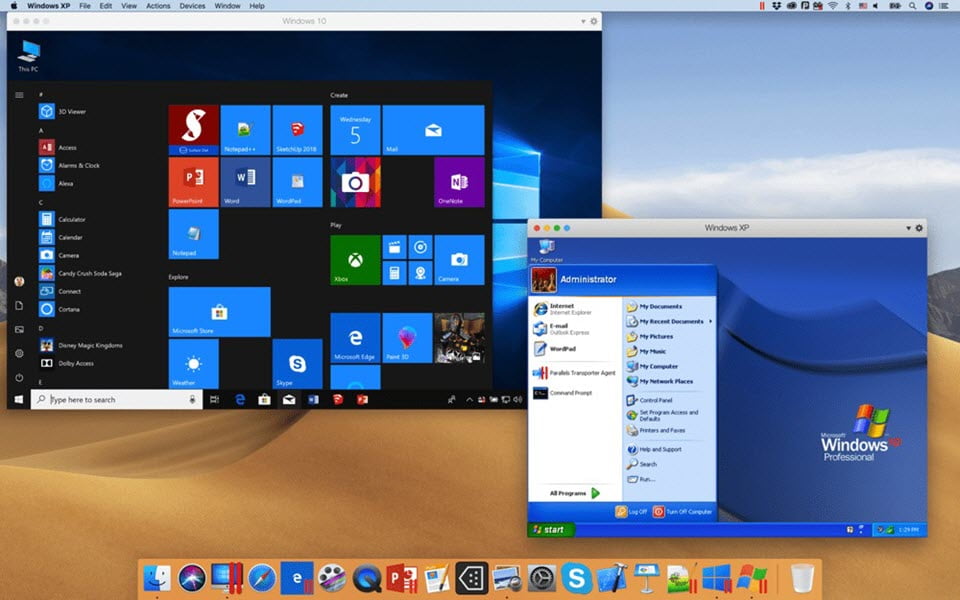
ภาพตัวอย่างโปรแกรม (Screenshots)
ความต้องการของระบบ (System Requirements)
macOS Mojave 10.14
macOS High Sierra 10.13.6 or later
macOS Sierra 10.12.6 or later
OS X El Capitan 10.11.6 or later
CPU : Intel Core 2 Duo or Xeon processor
RAM : 4 GB of memory (8 GB is recommended)
HDD : 600 MB of disk space on the boot volume (Macintosh HD)
SSD drive is recommended for better performance
ข้อมูลไฟล์ (File Info)
License : Trial
Software Version : 14.1.2-45485
ชื่อไฟล์ : PDBE.v14.1.2-45485.TNT.zip
ขนาดไฟล์ : 216 MB
นามสกุลไฟล์ : *.zip
Server : UploadMX Google Drive
วันที่อัพโหลด : 31/05/2019
แก้ไขล่าสุด : 02/06/2022 แก้ไขลิ้งค์แล้ว
รหัสผ่าน : sbz
โปรดระวังโฆษณาเด้งไปหน้าอื่น เช็คชื่อไฟล์, ขนาดไฟล์ ก่อนดาวน์โหลดทุกครั้ง
ดาวน์โหลด
รหัสแตกไฟล์คือ sbz
วิธีดาวน์โหลด วิธีแก้ลิ้งค์เกินโควต้า
" This file is for trial/educational and non-commercial use only. Using non-genuine software may cause various problems to use this software without any problems Please purchase a genuine license from the official website. "