Parallels Desktop Business Edition v16.5.0-49183 (macOS) โปรแกรม จำลอง Windows บน Mac ฟรี
ดาวน์โหลด โปรแกรม Parallels Desktop Business Edition v16.5.0-49183 (macOS) โปรแกรม จำลอง Windows บน Mac ฟรี

ดาวน์โหลด Parallels Desktop Business Edition -49183 (macOS) โปรแกรม จำลอง Windows บน Mac ฟรี ล่าสุด
Parallels Desktop 16 เป็นโปรแกรมสำหรับจำลอง Windows บน Mac (Macintosh) สามารถรันระบบปฏิบัติการอื่น ๆ ไปพร้อม ๆ กับ macOS ได้ โดยโปรแกรมนี้จะคล้ายกับโปรแกรม VMware (วีเอ็มแวร์) ของ Windows นั่นเอง Parallels Desktop for Mac พัฒนาเพื่อรองรับการติดตั้ง Windows 10 ได้ สามารถตั้งค่าการแบ่งหน่วยความจำไปยังส่วนของการใช้งานวินโดว์ได้อีกด้วย ด้วยคุณสมบัติเจ๋ง ๆ นับร้อยและเครื่องมือเพิ่มเติมสำหรับการใช้งานทั้งบน Mac และ Windows มาพร้อมกับอินเทอร์เฟซที่เรียบง่าย พร้อมด้วยเครื่องมือและฟังก์ชั่นในการใช้งานที่มีประสิทธิภาพมากมาย
Supported Operating Systems for virtual machines :
- Windows 10
- Windows 8.1
- Windows 8
- Windows Server 2012 R2
- Windows 7 (SP0-SP1)
- Windows Server 2008 R2 (SP0-SP2)
- Windows Vista Home, Business, Ultimate, Enterprise (SP0-SP2)
- Windows Server 2003 R2 (SP0-SP2)
- Windows XP (SP0-SP3)
- See Full OS Supported List
คุณสมบัติเด่น (Key Features)
- Fast, Powerful and Easy
- Develop & test across multiple OSes in a virtual machine for Mac
- Access Microsoft Office for Windows and Internet Explorer
- Fast—run Windows apps without slowing down your Mac
- Quickly move files, apps and more from a PC to a Mac
- Ultimate Flexibility
- Touch Bar
- Works with Boot Camp
- One-Click Tuning
- Office 365 Integration
- Save Disk Space
- Retina Display Support
- Instant Access
- Parallels Toolbox
- Remote Access
- Travel Mode
- And more.
What’s new in Parallels Desktop v16 ?:
- Improved and Faster Graphics
- Optimized for Big Sur 11.0
- Enhanced Integration
- Linux and macOS VMs
- More performance
- Download and install Windows 10 in one click
- Customize Touch Bar for Windows applications
- Convert VM bundles to a single file for transfer or deployment
- Rename custom networks
- Virtual RAM for each VM
- Virtual CPUs for each VM
- Other bug fixes and improvements.
ภาพตัวอย่างโปรแกรม (Screenshots)
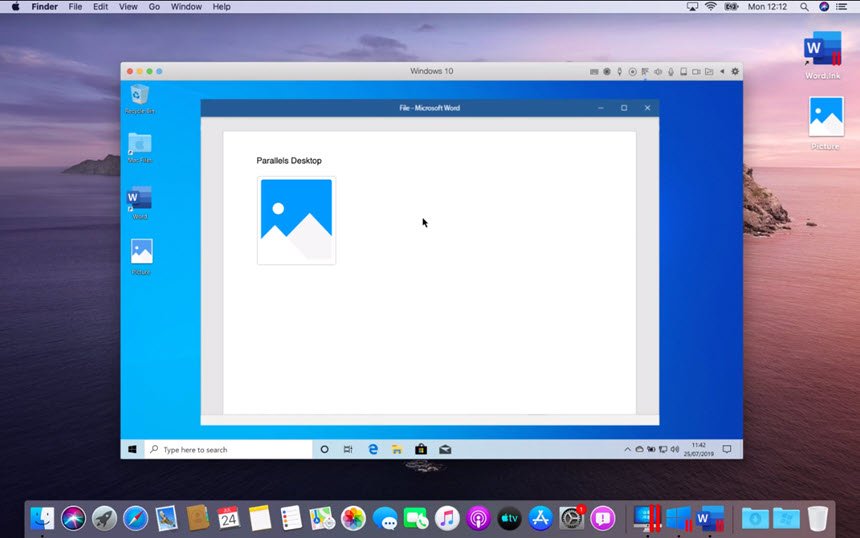
ความต้องการของระบบ (System Requirements)
CPU : Intel Core 2 Duo, Core i3, Core i5, Core i7, Core i9, Intel Core M or Xeon processor
RAM : 4 GB+
HDD : 500 GB+
Display : 1024 x 768 pixels or Higher
GPU : Intel, AMD Radeon, or NVIDIA
ข้อมูลไฟล์ (File Info)
License : Trial
Software Version : 16.5.0-49183
ชื่อไฟล์ : PDBE.v16.5.0-49183.macOS.zip
ขนาดไฟล์ : 197 MB
นามสกุลไฟล์ : *.zip
Server : UploadMX Google Drive
วันที่อัพโหลด : 02/01/2021
แก้ไขล่าสุด : 04/05/2022 แก้ไขลิ้งค์แล้ว
รหัสผ่าน : sbz
โปรดระวังโฆษณาเด้งไปหน้าอื่น เช็คชื่อไฟล์, ขนาดไฟล์ ก่อนดาวน์โหลดทุกครั้ง
ดาวน์โหลด
รหัสแตกไฟล์คือ sbz
วิธีดาวน์โหลด วิธีแก้ลิ้งค์เกินโควต้า
" If You Like This Software , Please Buy It From Official Website "