Spatial Manager for AutoCAD Professional 9.6.1.17012 ปลั๊กอินเสริมสำหรับโปรแกรม AutoCAD
ดาวน์โหลด โปรแกรม Spatial Manager for AutoCAD Professional 9.6.1.17012 ปลั๊กอินเสริมสำหรับโปรแกรม AutoCAD ฟรี

ดาวน์โหลด Spatial Manager for AutoCAD Professional 9 ล่าสุด ปลั๊กอินเสริมสำหรับโปรแกรม AutoCAD
Spatial Manager for AutoCAD Professional เป็นปลั๊กอินเสริมสำหรับโปรแกรม AutoCAD ที่ช่วยจัดการข้อมูลเชิงพื้นที่ (Spatial Data) อย่างมีประสิทธิภาพ เหมาะสำหรับงานด้านแผนที่ GIS, งานสำรวจ, วิศวกรรมโยธา, งานออกแบบสาธารณูปโภค และงานที่ต้องใช้ข้อมูลเชิงตำแหน่งร่วมกับแบบ CAD โปรแกรมนี้ช่วยให้ผู้ใช้งานสามารถนำเข้า ส่งออก และแปลงข้อมูลจากหลายรูปแบบได้อย่างรวดเร็ว พร้อมเครื่องมือวิเคราะห์เชิงพื้นที่แบบมืออาชีพ
Spatial Manager ช่วยให้คุณจัดการข้อมูลจากแหล่งข้อมูลภายนอก เช่น Shapefile (SHP), KML/KMZ, GPX, GeoJSON, SQLite, PostGIS, SQL Server, WFS และอื่น ๆ อีกมากมาย โดยไม่ต้องพึ่งโปรแกรม GIS เพิ่มเติม ทำให้ AutoCAD สามารถทำงานด้านภูมิสารสนเทศได้สะดวกและครบวงจรยิ่งขึ้น
จุดเด่นของ Spatial Manager for AutoCAD Professional
-
นำเข้าและส่งออกข้อมูล GIS ได้หลายรูปแบบ เช่น SHP, KML, CSV, GPX, GeoJSON
-
แปลงข้อมูลและพิกัด (Coordinate Transformation) ได้อย่างแม่นยำ
-
ดึงข้อมูลจากฐานข้อมูลภายนอก เช่น PostGIS, SQL Server, SpatialLite
-
สร้าง Map Background เช่น Google Maps, OpenStreetMap, Bing Maps เพื่ออ้างอิงบน AutoCAD
-
เครื่องมือวิเคราะห์เชิงพื้นที่ เช่น Buffer, Overlay, Select by Location
-
เพิ่มความสามารถ GIS ให้ AutoCAD โดยไม่ต้องใช้งานหลายโปรแกรม
-
เหมาะสำหรับงานโยธา สำรวจ ผังเมือง ไฟฟ้า ประปา สาธารณูปโภค และงานออกแบบภาคสนาม
เหมาะสำหรับใคร
-
วิศวกรโยธาและผังเมือง
-
นักสำรวจ (Surveyor) และผู้ใช้งาน GIS
-
บริษัทออกแบบสาธารณูปโภค ระบบไฟฟ้า ประปา โทรคมนาคม
-
องค์กรที่ต้องแปลงข้อมูล GIS ↔ CAD เป็นประจำ
-
ผู้ใช้งาน AutoCAD ที่ต้องการเพิ่มฟังก์ชันด้าน GIS แบบครบเครื่อง
Spatial Manager for AutoCAD Professional คือปลั๊กอินที่ช่วยเพิ่มพลังให้ AutoCAD สามารถจัดการข้อมูลเชิงพื้นที่ได้ครบวงจร ทั้งนำเข้า ส่งออก แปลงพิกัด และวิเคราะห์ข้อมูล GIS ทำให้งานโยธา สำรวจ และสาธารณูปโภคทำได้ง่ายและแม่นยำยิ่งขึ้น เหมาะสำหรับผู้ที่ต้องการให้ AutoCAD ทำงานด้าน GIS ได้อย่างเต็มประสิทธิภาพในเครื่องมือเดียว
คุณสมบัติเด่น (Key Features)
- Import spatial data into AutoCAD
Imports spatial data, into new or existing AutoCAD drawings, as AutoCAD objects and Extended Entity Data (EED/XDATA)
Export spatial data from AutoCAD
Export objects from the drawing to spatial files or databases, and saves their Extended Entity Data (EED/XDATA) as alphanumeric data tables
Coordinates transformation Updated V9
Calculate geometric transformations of the objects in the import and export processes
Background maps Updated V9
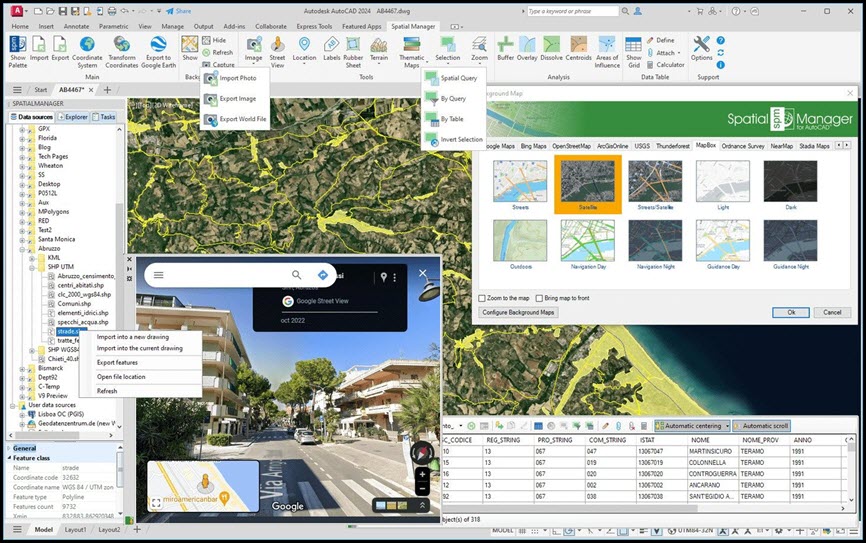
Choose from among a lot of dynamic Backgrounds Maps from providers such as Google Maps, OpenStreetMap, Bing, MapBox, Ordnance Survey, etc., configure your own maps from TMS, WMS or WMTS servers or connect to Cloud Optimized GeoTIFF (COG) type sources
Publishing to Google Earth
Export all or part of the objects in the visible Layers of the drawing and their data to a KML or KMZ file
Thematic maps
Visualize objects coloring them depending on their field values
ภาพตัวอย่างโปรแกรม (Screenshots)
ความต้องการของระบบ (System Requirements)
AutoCAD, AutoCAD Map 3D, AutoCAD Civil 3D and AutoCAD Architecture (Windows Only)
Versions: From v.2013 to v.2026 both included. Review the version compatibility page for more details.
Note: AutoCAD LT is not a compatible application because of its intrinsic limitations but you can use Spatial Manager Desktop™ to import/export via DXF files
ข้อมูลไฟล์ (File Info)
License : Trial
Software Version : 9.6.1.17012
ชื่อไฟล์ : SMACADP9.6.1.17012.rar
ขนาดไฟล์ : 329 MB
นามสกุลไฟล์ : *.rar
เซิฟเวอร์ : Pixeldrain MediaFire
วันที่อัพโหลด : 29/11/2025
แก้ไขล่าสุด : 29/11/2025
รหัสผ่าน : sbz
โปรดระวังโฆษณาเด้งไปหน้าอื่น เช็คชื่อไฟล์, ขนาดไฟล์ ก่อนดาวน์โหลดทุกครั้ง
ดาวน์โหลด
รหัสแตกไฟล์คือ sbz
วิธีดาวน์โหลด วิธีแก้ลิ้งค์เกินโควต้า
" This file is for trial/educational and non-commercial use only. Using non-genuine software may cause various problems to use this software without any problems Please purchase a genuine license from the official website. "