Ondesoft Spotify Music Converter โปรแกรมแปลงเพลงจาก Spotify เป็น MP3
ดาวน์โหลด โปรแกรม Ondesoft Spotify Music Converter 4.9.9 โปรแกรมแปลงเพลง Spotify เป็น MP3/FLAC ฟังออฟไลน์ง่าย ฟรี

ดาวน์โหลด Ondesoft Spotify Music Converter โปรแกรมแปลงเพลงจาก Spotify เป็น MP3
Ondesoft Spotify Music Converter คือโปรแกรมแปลงเพลงจาก Spotify ที่ได้รับความนิยมสำหรับผู้ใช้ที่ต้องการดาวน์โหลดและแปลงไฟล์เพลงไปใช้งานแบบออฟไลน์อย่างสะดวก รองรับการแปลง Spotify Music เป็นไฟล์เสียงหลายรูปแบบ เช่น MP3, AAC, WAV, FLAC และอื่น ๆ พร้อมคงรายละเอียดเพลงสำคัญไว้ได้ครบ ไม่ว่าจะเป็นชื่อเพลง ศิลปิน อัลบั้ม ปีที่ออก และข้อมูลแท็ก (ID3 Tag) เหมาะสำหรับคนที่ต้องการจัดคลังเพลงให้เป็นระเบียบ ใช้งานได้ทั้งบนคอมพิวเตอร์และโน้ตบุ๊ก โดยเน้นความง่ายในการใช้งานและคุณภาพเสียงที่ดี
จุดเด่นของ Ondesoft Spotify Music Converter คือช่วยให้การแปลงเพลงจาก Spotify เป็นไฟล์มาตรฐานทำได้รวดเร็ว รองรับการแปลงเป็นชุด (Batch Convert) และมีตัวเลือกปรับคุณภาพเสียง/บิตเรตเพื่อให้เหมาะกับการฟังบนอุปกรณ์ต่าง ๆ เช่น PC, Mac, มือถือ, เครื่องเล่นเพลง หรือระบบเครื่องเสียงภายในรถ นอกจากนี้ยังรองรับการจัดการเพลย์ลิสต์ (Playlist), อัลบั้ม (Album) และเพลงที่บันทึกไว้ (Liked Songs) ช่วยให้การดาวน์โหลดเพลงจาก Spotify เพื่อนำไปฟังออฟไลน์หรือสำรองไฟล์ทำได้คล่องตัวมากขึ้น เหมาะทั้งสายฟังเพลงทั่วไปและคนที่จริงจังกับการจัดไลบรารีเพลงส่วนตัว
หากคุณกำลังมองหาเครื่องมือแปลง Spotify เป็น MP3 แบบใช้งานง่าย Ondesoft Spotify Music Converter เป็นอีกตัวเลือกที่ตอบโจทย์ ทั้งด้านความเสถียร ความเร็ว และความสามารถในการคงคุณภาพเสียง รวมถึงรองรับการแปลงเพลง Spotify เป็น FLAC สำหรับผู้ที่ต้องการไฟล์คุณภาพสูง โปรแกรมนี้จึงเหมาะสำหรับการนำเพลงไปใช้กับหลายอุปกรณ์ และช่วยให้คุณบริหารจัดการเพลงจาก Spotify ได้สะดวกยิ่งขึ้น โดยเฉพาะผู้ที่ต้องการไฟล์เพลงแยกเป็นโฟลเดอร์ตามศิลปิน/อัลบั้มเพื่อค้นหาได้ง่าย
คุณสมบัติเด่น (Key Features)
- Download Spotify songs, albums, artists, and playlists without Premium.
Convert Spotify to MP3, M4A, AAC, FLAC, WAV and AIFF.
Download Spotify songs to MP3 at 320kbps.
Preserve all ID3 tags.
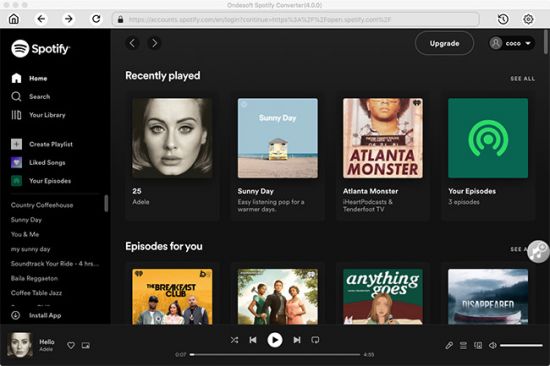
Built-in Spotify web player. - Download Spotify Music without Premium
Ondesoft Spotify Converter downloads Spotify music by recording from Spotify with 100% original quality. You can record the streaming music with both Spotify free and premium subscription and output plain formats thanks to the advanced DRM decrypting technology. - It downloads Spotify music at 10X speed on Windows PC with 100% original quality. Now you can easily tranfer and play any Spotify song and playlist to your mobile phone, MP3 player, iPod, HDTV, Xbox 360, Xbox one, PS4, Zune, Creative Zen or burn to CD, etc. without any limitations.
- Spotify songs can be downloaded by a free account.
Keep Audio Quality 100% Original.
Built-in Spotify web player, no Spotify app needed. - Convert Spotify to MP3/M4A/WAV/FLAC
With Spotify Converter for Windows, it is extremely fast to download and convert any Spotify songs and playlists to MP3, M4A, AAC, FLAC, WAV and AIFF at 10X speed so that you can play them on any music player freely.
Convert Spotify Music to MP3.
Save Spotify songs to USB drive, SD card, etc.
Easily burn Spotify to CD with High Quality.
ภาพตัวอย่างโปรแกรม (Screenshots)
ความต้องการของระบบ (System Requirements)
Internet connection
ข้อมูลไฟล์ (File Info)
License : Trial
Software Version : 4.9.9
ชื่อไฟล์ : OSMC4.9.9.rar
ขนาดไฟล์ : 209 MB
นามสกุลไฟล์ : *.rar
เซิฟเวอร์ : Pixeldrain | Box
วันที่อัพโหลด : 01/01/2026
แก้ไขล่าสุด : 01/01/2026
รหัสผ่าน : sbz
โปรดระวังโฆษณาเด้งไปหน้าอื่น เช็คชื่อไฟล์, ขนาดไฟล์ ก่อนดาวน์โหลดทุกครั้ง
ดาวน์โหลด
รหัสแตกไฟล์คือ sbz
วิธีดาวน์โหลด วิธีแก้ลิ้งค์เกินโควต้า
" This file is for trial/educational and non-commercial use only. Using non-genuine software may cause various problems to use this software without any problems Please purchase a genuine license from the official website. "