Nero Video 27.0.0.2 โปรแกรมตัดต่อวิดีโอ ใช้ง่าย
ดาวน์โหลด โปรแกรม Nero Video 27.0.0.2 โปรแกรมตัดต่อวิดีโอใช้งานง่าย ทำคลิปสวยได้เร็ว ฟรี

ดาวน์โหลด Nero Video 27 ล่าสุด โปรแกรมตัดต่อวิดีโอ ใช้ง่าย
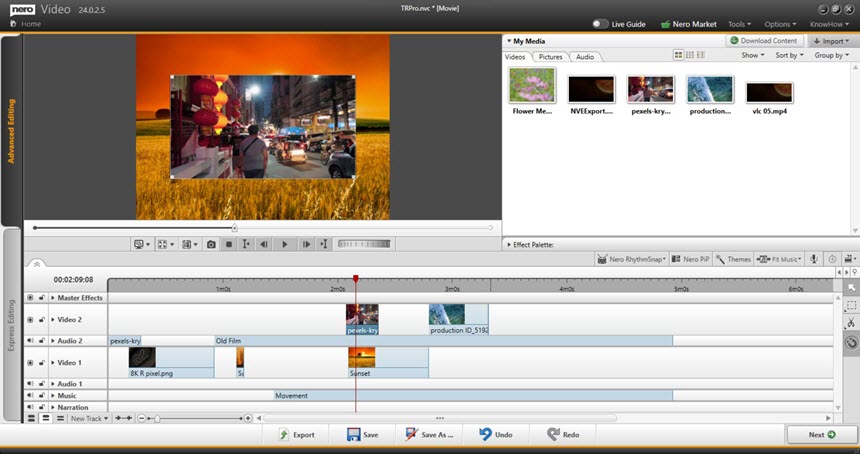
Nero Video คือโปรแกรม ตัดต่อวิดีโอ (Video Editor) สำหรับ Windows ที่ออกแบบมาให้ใช้งานง่าย เหมาะกับผู้เริ่มต้นและคนที่อยากทำคลิปแบบรวดเร็ว เช่น คลิปครอบครัว ท่องเที่ยว รีวิวสินค้า งานโรงเรียน/งานพรีเซนต์ หรือคอนเทนต์ลงโซเชียล จุดเด่นคือมีเครื่องมือพื้นฐานครบ ทั้งตัดต่อบนไทม์ไลน์ ใส่เพลง/เสียง บรรยาย ใส่ข้อความ ทรานซิชัน และเอฟเฟกต์ รวมถึงการส่งออกไฟล์ให้เหมาะกับการอัปโหลดไป YouTube หรือแพลตฟอร์มต่างๆ ได้สะดวก
คุณสมบัติเด่น (Key Features)
- Manage
Bring your videos and image files from mobile devices, external hard drives, USB sticks, camcorders, and HD and 4K cameras to your computer with ease. Store them centrally in your media library from the Nero MediaHome software for further editing with a wealth of information such as the date of recording, locations, or people depicted. Now you can also archive and watch your movies and TV series in a flash. Film titles and posters are created automatically. New: Access your “OneDrive” online files (Files On Demand) and download your pictures, videos and music only when you need them for your project. This saves you a lot of storage space on your PC. - Create
Put your shots in the spotlight: 1-Click Video Story lets you create perfect movies and slideshows in no time. Complete with music, effects, entry and exit, you can share your movies in a flash. Captivate your audience with express or advanced video editing with countless effects like tilt shift, old movie, slow motion, titles, transitions, audio filters, keyframe animations and more. With the new 1-click bar remover, you’ll be able to spruce up your photo and video footage and get it ready for the optimal big-screen movie experience. - Templates
Quickly and easily create professional videos: With over 1000 movie templates and other effects, you give your videos a very personal touch. With the new various movie templates including effect drop zone, they automatically create their own personal movies on topics such as family, celebrations, children, travel, action and more. Black bars in widescreen TV are now a thing of the past. Even vertical videos and photos from your smartphone can be easily imported as a vertical video, edited and perfectly staged thanks to vertical video templates. - Exporting and burning
Best movies for happy viewers: Nero Video software doesn’t compromise on format selection either. Edit movies in the highest quality in 4K, Full HD, and SD. Even export individual scenes from long movies in one go. Add the finishing touches to your DVD Videos™ and Blu-ray Discs™ with numerous high-quality disc menus on many themes. Then design your disc covers to your taste with Nero CoverDesigner software and play your video disc professionally with menu and chapter selection on the DVD and Blu-ray player in your living room. - Streaming
Turn your living room into a cinema: The Nero Video software convinces with Oscar-worthy streaming functions. Slideshows or videos on the TV, music from your media library on your smartphone, videos on your tablet? All possible with the free app Nero Streaming Player. With the app WiFi Transfer, which is also free, you can transfer your videos and pictures wirelessly from your mobile device to your PC and vice versa. Both apps are available for iOS and Android devices. - Playback
Choose when it’s primetime: morning, noon or night – play audio and video files in a variety of formats when you feel like it. Playing photos, elegant slideshows, video DVDs and 4K/Ultra HD videos is now even easier. You can also easily manage and play your archive of movies and TV shows, just like primetime.
ภาพตัวอย่างโปรแกรม (Screenshots)
ความต้องการของระบบ (System Requirements)
– Windows® 7 SP1 Home Premium,
Professional or Ultimate (32/64 bit),
Windows® 8 (32/64 bit), with April 2014 Update (32/64 bit),
Windows® 10 (32/64 bit) , Windows® 11 (32/64 bit)
– 2 GHz AMD or Intel® processor
– 1 GB RAM
– 5 GB hard drive space for a typical installation of all components (including templates, content and temporary disk space)
– Microsoft ® DirectX ® 0 compliant graphics card
– DVD disc drive for installation and playback
– CD, DVD, or Blu-ray Disc recordable or rewritable drive for burning
– WindowsMedia ® Player 9 or higher
– Internet Explorer 11 and higher
Professional or Ultimate (32/64 bit),
Windows® 8 (32/64 bit), with April 2014 Update (32/64 bit),
Windows® 10 (32/64 bit) , Windows® 11 (32/64 bit)
– 2 GHz AMD or Intel® processor
– 1 GB RAM
– 5 GB hard drive space for a typical installation of all components (including templates, content and temporary disk space)
– Microsoft ® DirectX ® 0 compliant graphics card
– DVD disc drive for installation and playback
– CD, DVD, or Blu-ray Disc recordable or rewritable drive for burning
– WindowsMedia ® Player 9 or higher
– Internet Explorer 11 and higher
ข้อมูลไฟล์ (File Info)
Official Website : https://www.nero.com/
License : Trial
Software Version : 27.0.0.2
ชื่อไฟล์ : NV27.0.0.2.rar
ขนาดไฟล์ : 1.06 GB
นามสกุลไฟล์ : *.rar
เซิฟเวอร์ : Pixeldrain | MediaFire
วันที่อัพโหลด : 28/12/2025
แก้ไขล่าสุด : 28/12/2025
รหัสผ่าน : sbz
License : Trial
Software Version : 27.0.0.2
ชื่อไฟล์ : NV27.0.0.2.rar
ขนาดไฟล์ : 1.06 GB
นามสกุลไฟล์ : *.rar
เซิฟเวอร์ : Pixeldrain | MediaFire
วันที่อัพโหลด : 28/12/2025
แก้ไขล่าสุด : 28/12/2025
รหัสผ่าน : sbz
โปรดระวังโฆษณาเด้งไปหน้าอื่น เช็คชื่อไฟล์, ขนาดไฟล์ ก่อนดาวน์โหลดทุกครั้ง
ดาวน์โหลด
รหัสแตกไฟล์คือ sbz
วิธีดาวน์โหลด วิธีแก้ลิ้งค์เกินโควต้า
" This file is for trial/educational and non-commercial use only. Using non-genuine software may cause various problems to use this software without any problems Please purchase a genuine license from the official website. "