Maplesoft Maple 2025.2 โปรแกรมคำนวณทางคณิตศาสตร์
ดาวน์โหลด โปรแกรม Maplesoft Maple 2025.2 (x64) โปรแกรมคำนวณทางคณิตศาสตร์ ฟรี

ดาวน์โหลด Maplesoft Maple 2025.2 โปรแกรมคำนวณทางคณิตศาสตร์
Maplesoft Maple คือซอฟต์แวร์ทางคณิตศาสตร์ที่ทรงพลังและหลากหลายฟังก์ชันการใช้งาน พัฒนาโดยบริษัท Maplesoft ซึ่งมีสำนักงานใหญ่ในเมืองวอเตอร์ลู ประเทศแคนาดา Maple เป็นที่รู้จักกันดีในฐานะ ระบบพีชคณิตคอมพิวเตอร์ (Computer Algebra System – CAS) ที่มีความสามารถสูง
คุณสมบัติหลักของ Maplesoft Maple:
- คณิตศาสตร์เชิงสัญลักษณ์ (Symbolic Math): Maple มีความโดดเด่นในการจัดการนิพจน์ทางคณิตศาสตร์เชิงสัญลักษณ์ สามารถแก้สมการ ดิฟ อินทิเกรต หาอนุพันธ์ และดำเนินการทางคณิตศาสตร์อื่นๆ ในรูปแบบสัญลักษณ์ได้อย่างแม่นยำ
- คณิตศาสตร์เชิงตัวเลข (Numeric Math): นอกจากสัญลักษณ์แล้ว Maple ยังสามารถคำนวณตัวเลขได้อย่างแม่นยำสูง แม้จะเป็นทศนิยมที่ยาวมาก
- การวิเคราะห์ข้อมูล (Data Analysis): มีเครื่องมือสำหรับการวิเคราะห์ข้อมูลที่หลากหลาย ช่วยในการจัดการและทำความเข้าใจชุดข้อมูล
- การสร้างภาพ (Visualization): สามารถสร้างกราฟ 2D และ 3D รวมถึงภาพเคลื่อนไหวที่ปรับแต่งได้ เพื่อแสดงผลข้อมูลและสมการทางคณิตศาสตร์ในรูปแบบที่เข้าใจง่าย
- การเขียนโปรแกรม (Programming): Maple มีภาษาการเขียนโปรแกรมในตัวที่คล้ายกับ Pascal ทำให้ผู้ใช้สามารถสร้างอัลกอริทึมและแอปพลิเคชันที่ซับซ้อนได้ นอกจากนี้ยังสามารถเชื่อมต่อกับภาษาโปรแกรมอื่นๆ เช่น C, C#, Fortran, Java, MATLAB และ Visual Basic รวมถึง Microsoft Excel
- อินเทอร์เฟซเอกสาร (Document Interface): ช่วยให้สร้างเอกสารการออกแบบที่สามารถตรวจสอบได้ ซึ่งประกอบด้วยคณิตศาสตร์ ข้อความ ภาพ และกราฟ ทำให้สามารถบันทึกและจัดการการคำนวณได้อย่างมีประสิทธิภาพ
- ฟังก์ชันในตัวจำนวนมาก: มีฟังก์ชันในตัวมากกว่า 5,000 ฟังก์ชัน ครอบคลุมเกือบทุกสาขาวิชาวิศวกรรม เช่น สมการเชิงอนุพันธ์ การวิเคราะห์ข้อมูล การหาค่าเหมาะสมที่สุด (optimization) และคุณสมบัติของของไหลและสารเคมี
- รองรับหน่วยวัด (Units): มีการรองรับหน่วยวัดอย่างเต็มรูปแบบ ทำให้การคำนวณมีความถูกต้องและแม่นยำ
การใช้งาน Maplesoft Maple:
Maple ถูกนำไปใช้งานอย่างแพร่หลายในหลากหลายสาขา เช่น:
- การศึกษา: เป็นเครื่องมือที่สำคัญสำหรับการเรียนการสอนวิชาคณิตศาสตร์ วิศวกรรมศาสตร์ และวิทยาศาสตร์ในระดับมหาวิทยาลัยและโรงเรียน สามารถช่วยในการแก้ปัญหา ทำความเข้าใจแนวคิดทางคณิตศาสตร์ และสร้างแบบจำลอง
- อุตสาหกรรมและงานวิศวกรรม: ใช้ในการออกแบบ วิเคราะห์ และแก้ไขปัญหาทางวิศวกรรมที่ซับซ้อน เช่น การออกแบบเครื่องจักร หุ่นยนต์ ระบบพลังงาน การวิเคราะห์การสั่นสะเทือน การสร้างแบบจำลองแบตเตอรี่ และการจัดการการคำนวณ
- การวิจัย: ใช้ในการวิเคราะห์เชิงลึก การพัฒนาอัลกอริทึม และการสร้างแบบจำลองทางคณิตศาสตร์สำหรับงานวิจัยต่างๆ
- การเงิน: มีเครื่องมือสำหรับการคำนวณทางการเงิน เช่น พันธบัตร เงินงวด และตราสารอนุพันธ์
Maplesoft Maple เป็นเครื่องมือที่ครบวงจรสำหรับการคำนวณทางคณิตศาสตร์ การวิเคราะห์ข้อมูล การสร้างภาพ และการเขียนโปรแกรม ซึ่งช่วยให้ผู้ใช้งานสามารถแก้ปัญหาที่ซับซ้อนได้อย่างมีประสิทธิภาพและแม่นยำ
คุณสมบัติเด่น (Key Features)
Core Capabilities
- Symbolic Math: Maple truly shines here. It can manipulate mathematical expressions symbolically, meaning it can solve equations, differentiate, integrate, and perform other operations with precision, keeping everything in symbolic form.
- Numeric Math: Beyond symbols, Maple can perform numerical calculations with extremely high precision, even with very long decimals.
- Data Analysis: It comes with a range of tools to help you analyze, manage, and understand datasets.
- Visualization: You can create customizable 2D and 3D graphs, plus animations, to easily visualize mathematical data and equations.
- Programming: Maple has its own built-in programming language, similar to Pascal, allowing users to create complex algorithms and applications. It also plays well with other programming languages like C, C#, Fortran, Java, MATLAB, Visual Basic, and even Microsoft Excel.
- Document Interface: This feature lets you create verifiable design documents that combine math, text, images, and graphs. It’s super handy for recording and managing your calculations effectively.
- Extensive Built-in Functions: With over 5,000 built-in functions, Maple covers almost every engineering discipline, including differential equations, data analysis, optimization, and properties of fluids and chemicals.
- Units Support: It fully supports units of measurement, ensuring your calculations are accurate and consistent.
Where Maple is Used
Maple is widely adopted across various fields:
- Education: It’s an essential tool for teaching and learning mathematics, engineering, and science at universities and schools. It helps students solve problems, grasp mathematical concepts, and build models.
- Industry and Engineering: Engineers use it for complex design, analysis, and problem-solving tasks, like designing machinery and robots, analyzing vibrations, modeling batteries, and managing engineering calculations.
- Research: It’s a go-to for in-depth analysis, algorithm development, and creating mathematical models for various research projects.
- Finance: Maple offers tools for financial calculations, such as those related to bonds, annuities, and derivatives.
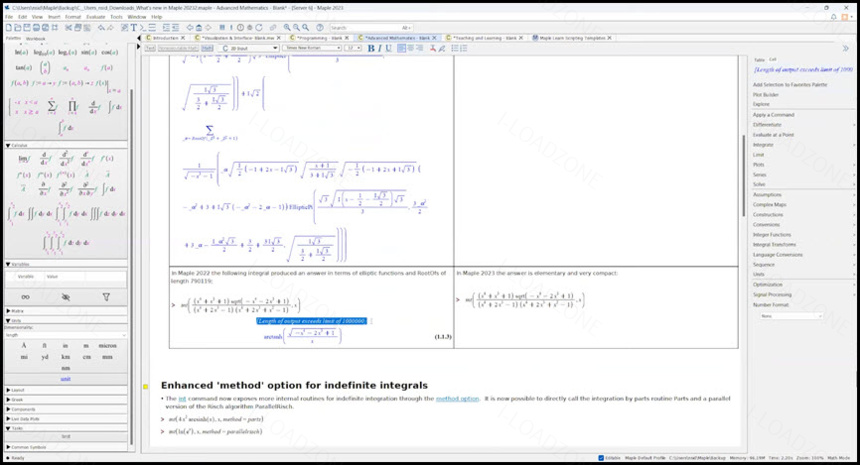
ภาพตัวอย่างโปรแกรม (Screenshots)
ความต้องการของระบบ (System Requirements)
CPU: 1 gigahertz (GHz) or faster 64-bit (x64) processor
RAM: 4 GB recommended (though 8 GB is often seen for more intensive use)
ข้อมูลไฟล์ (File Info)
License : Trial
Software Version : 2025.2
ชื่อไฟล์ : MM2025.2(64).rar
ขนาดไฟล์ : 2.29 GB
นามสกุลไฟล์ : *.rar
Server : Google Drive
วันที่อัพโหลด : 29/11/2025
แก้ไขล่าสุด : 29/11/2025
รหัสผ่าน : sbz
โปรดระวังโฆษณาเด้งไปหน้าอื่น เช็คชื่อไฟล์, ขนาดไฟล์ ก่อนดาวน์โหลดทุกครั้ง
Buy
ดาวน์โหลด
รหัสแตกไฟล์คือ sbz
วิธีดาวน์โหลด วิธีแก้ลิ้งค์เกินโควต้า
" This file is for trial/educational and non-commercial use only. Using non-genuine software may cause various problems to use this software without any problems Please purchase a genuine license from the official website. "