Macrorit Data Wiper 8.3.0 โปรแกรมลบข้อมูลถาวร ปลอดภัย
ดาวน์โหลด โปรแกรม Macrorit Data Wiper 8.3.0 โปรแกรมลบข้อมูลถาวร ปลอดภัย มาตรฐานระดับมืออาชีพ ฟรี

ดาวน์โหลด Macrorit Data Wiper 8 ล่าสุด โปรแกรมลบข้อมูลถาวร ปลอดภัย
Macrorit Data Wiper คือซอฟต์แวร์สำหรับลบข้อมูลออกจากฮาร์ดดิสก์และอุปกรณ์จัดเก็บข้อมูลแบบถาวร (Data Erasing) ที่ได้รับความนิยมในระดับมืออาชีพ โปรแกรมถูกออกแบบมาเพื่อช่วยลบไฟล์ ข้อมูล และพาร์ทิชันโดยไม่สามารถกู้คืนได้ เหมาะสำหรับผู้ใช้งานทั่วไป องค์กร และธุรกิจที่ต้องการความปลอดภัยของข้อมูลสูงสุด
Macrorit Data Wiper คืออะไร และใช้ทำอะไรได้บ้าง
Macrorit Data Wiper ทำหน้าที่ลบข้อมูลในระดับลึก โดยใช้มาตรฐานการลบข้อมูลสากล เช่น DoD 5220.22-M และอัลกอริทึมการลบข้อมูลขั้นสูง เพื่อให้มั่นใจว่าข้อมูลที่ถูกลบจะไม่สามารถกู้คืนได้ด้วยโปรแกรมกู้ข้อมูลใด ๆ โปรแกรมสามารถลบได้ทั้งไฟล์เดี่ยว โฟลเดอร์ ฮาร์ดดิสก์ทั้งลูก พาร์ทิชัน และพื้นที่ว่าง (Free Space)
ซอฟต์แวร์นี้เหมาะอย่างยิ่งสำหรับการขายต่อคอมพิวเตอร์ การโอนอุปกรณ์ หรือการทำลายข้อมูลสำคัญก่อนนำไปใช้งานใหม่
จุดเด่นของ Macrorit Data Wiper
Macrorit Data Wiper มาพร้อมฟีเจอร์ที่ช่วยให้การลบข้อมูลปลอดภัยและมีประสิทธิภาพสูง
-
ลบข้อมูลแบบถาวร ไม่สามารถกู้คืนได้
-
รองรับการลบฮาร์ดดิสก์ SSD และ HDD
-
ลบพาร์ทิชันและพื้นที่ว่างได้
-
ใช้มาตรฐานการลบข้อมูลระดับสากล
-
อินเทอร์เฟซใช้งานง่าย ไม่ซับซ้อน
ฟีเจอร์เหล่านี้ช่วยให้การจัดการข้อมูลที่ละเอียดอ่อนเป็นไปอย่างมั่นใจ
Macrorit Data Wiper เหมาะกับใคร
Macrorit Data Wiper เหมาะสำหรับผู้ใช้งานหลายกลุ่ม เช่น
-
ผู้ที่ต้องการลบข้อมูลก่อนขายหรือโอนคอมพิวเตอร์
-
องค์กรและบริษัทที่ต้องปกป้องข้อมูลภายใน
-
ผู้ดูแลระบบและฝ่ายไอที
-
ผู้ที่ต้องการลบข้อมูลส่วนตัวอย่างปลอดภัย
ไม่ว่าจะเป็นการลบไฟล์ทั่วไปหรือข้อมูลสำคัญระดับองค์กร โปรแกรมนี้ก็สามารถตอบโจทย์ได้อย่างครบถ้วน
ข้อดีของ Macrorit Data Wiper
-
ลบข้อมูลได้อย่างถาวรและปลอดภัย
-
รองรับอุปกรณ์จัดเก็บข้อมูลหลากหลาย
-
ทำงานรวดเร็วและเสถียร
-
ลดความเสี่ยงจากการรั่วไหลของข้อมูล
-
เหมาะสำหรับการใช้งานทั้งส่วนบุคคลและธุรกิจ
ด้วยคุณสมบัติเหล่านี้ Macrorit Data Wiper จึงเป็นเครื่องมือสำคัญด้านความปลอดภัยของข้อมูล
สรุป Macrorit Data Wiper
Macrorit Data Wiper คือโปรแกรมลบข้อมูลถาวรที่มีความปลอดภัยสูง เหมาะสำหรับผู้ที่ต้องการป้องกันการกู้คืนข้อมูลและรักษาความเป็นส่วนตัวของข้อมูลสำคัญ หากคุณกำลังมองหาเครื่องมือสำหรับลบข้อมูลอย่างมืออาชีพ เชื่อถือได้ และใช้งานง่าย Macrorit Data Wiper คือหนึ่งในตัวเลือกที่ไม่ควรมองข้าม
คุณสมบัติเด่น (Key Features)
WHY DATA WIPER PRO + EDITION
WIPE FREE SPACE
Keeps system intact and free space clear of sensitive data
WIPE HARD DRIVE
Wipe non-system disk all partitions on HDD or SSD with one click
WIPE PARTITION/VOLUME
Wipe certain data partition or non-system volume
WIPE EXTERNAL DRIVES
Wipe USB flash drives, memory sticks, micro SD cards or TF cards
WIPE SYSTEM DRIVE
Wipe C Drive, or system partition without bootable CD
FREE UPGRADE
Lifetime free upgrade services on Pro + Edition
COMMERCIAL USE
Allow commercial use on Data Wiper Pro + Edition
Wipe Recycle Bin
Permanently wipe files in Recycle bin (unlimited files)
Main Features
Completely wipe system/boot partition. Many program files are stored in system disk drive by default. If you or your organization want to permanently wipe disk drive to prevent your data from unauthorized using, this feature is necessary
Commercial use means IT Pros, technical service providers, or other organizations have authority to provide charged technical services to help diverse clients
Free lifetime upgrade gives you continually upgraded features for Free. You can take the guesswork out of software budgeting by paying for tomorrow’s software at today’s prices
Periodic friendly notifications. Rest assured that you or your organization will always know about the latest updates and improvements to Macrorit perpetual software
Difference between Pro and Unlimited Edition is that
Unlimited Edition means one code multiple pcs in one company
Securely Wipe Free Space – No Recover Chance
For privacy and security purpose, you can use Macrorit Disk Partition Wiper Pro Edition to securely wipe free space without any chance of recovery
Other features of Data Wiper
Quickly and efficiently sanitize the hard disks and wipe/erase exactly what you need
Wipe hard disks or separate partitions (system, boot partitions; primary, extended or logical)
5 wiping methods irreversibly destroy all on-disk data
Quickly and efficiently sanitize the hard disks and wipe/erase exactly what you need
It rarely occupies system resource
Extremely easy to manage and understand Windows style
Support for the latest HDD standards (Advanced Format Drive), 2TB+ and non-512B sector size drives
Support large IDE, SCSI, SATA and newGPT/uEFI-formatted hard disks, USB 1.0, USB 2.0, USB 3.0 flash memory drives
Common FAT16/32, NTFS file systems are supported
Well compatible with latest Windows 10 and Windows 9/8/7/XP/Vista, Server 2003/2008/2012 and Home Server 2011, Windows SBS 2003/2008/2011/2012 (both 32 & 64 bit)
Support GPT disk up to 4TB
Support all hardware RAID wipe operation, such as RAID 0, 1, 5, 10, etc
Wipe virtual hard drive in VMware, Virtual Box and Virtual PC
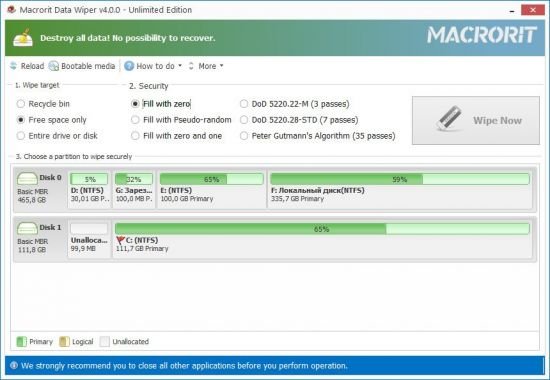
ภาพตัวอย่างโปรแกรม (Screenshots)
ความต้องการของระบบ (System Requirements)
ข้อมูลไฟล์ (File Info)
License : Trial
Software Version : 8.3.0
ชื่อไฟล์ : MDW8.3.0.rar
ขนาดไฟล์ : 10.7 MB
นามสกุลไฟล์ : *.rar
เซิฟเวอร์ : Pixeldrain | Box
วันที่อัพโหลด : 24/12/2025
แก้ไขล่าสุด : 24/12/2025
รหัสผ่าน : sbz
โปรดระวังโฆษณาเด้งไปหน้าอื่น เช็คชื่อไฟล์, ขนาดไฟล์ ก่อนดาวน์โหลดทุกครั้ง
ดาวน์โหลด
รหัสแตกไฟล์คือ sbz
วิธีดาวน์โหลด วิธีแก้ลิ้งค์เกินโควต้า
" This file is for trial/educational and non-commercial use only. Using non-genuine software may cause various problems to use this software without any problems Please purchase a genuine license from the official website. "