Home Plan Pro v5.8.2.1 โปรแกรม ออกแบบบ้าน เขียนแปลนบ้าน 2D ใช้งานง่าย ฟรี
ดาวน์โหลด โปรแกรม Home Plan Pro v5.8.2.1 โปรแกรม ออกแบบบ้าน เขียนแปลนบ้าน ใช้งานง่าย ฟรี
ดาวน์โหลด Home Plan Pro โปรแกรม ออกแบบบ้าน เขียนแปลนบ้าน 2D ใช้งานง่าย ฟรี ล่าสุด
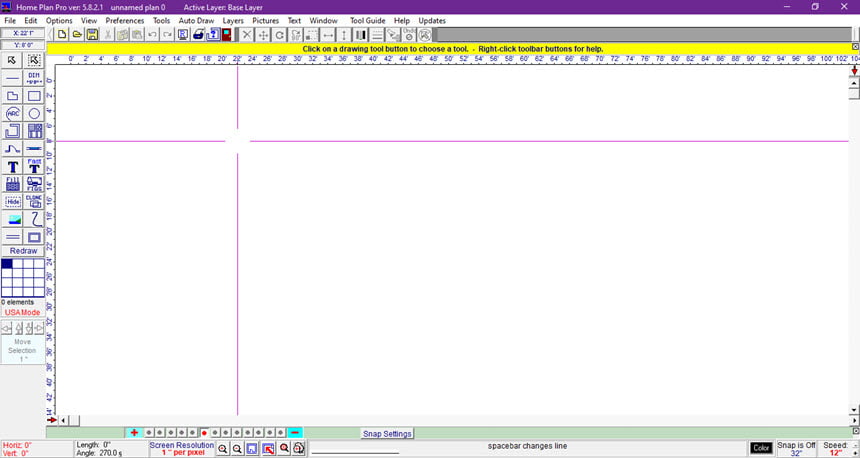
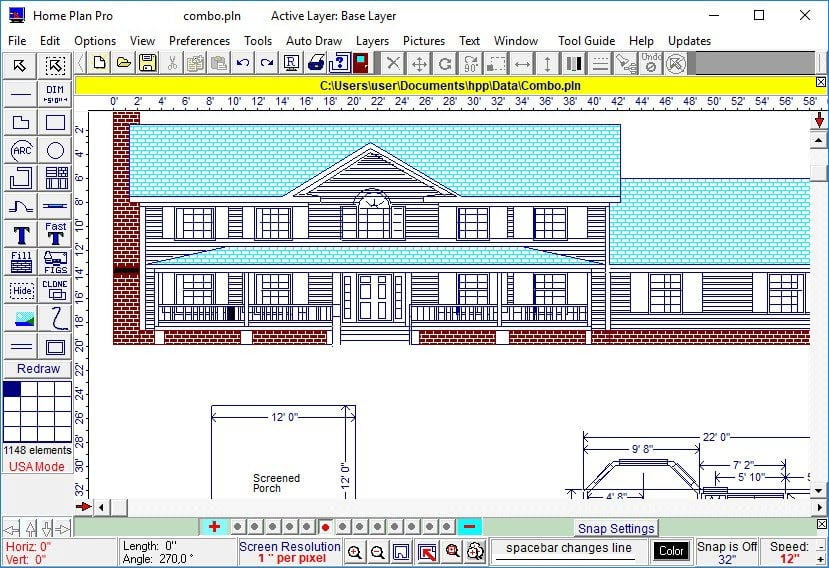
Home Plan Pro 5 เป็นโปรแกรมสำหรับ ออกแบบบ้าน เขียนแปลนบ้าน ใช้งานง่าย ไฟล์เล็ก เป็นเครื่องมือเขียนแบบบ้านที่ง่ายต่อการเรียนรู้ ขนาดเล็ก และใช้งานได้กับ Windows ทุกรุ่น รองรับ Windows 10 รุ่นล่าสุด ใช้ในการเขียนแปลนบ้าน 2 มิติคุณภาพสูง มีบทแนะนำเกี่ยวกับการใช้คุณสมบัติทั้งหมด มีตัวเลือกมากมายสำหรับการพิมพ์แปลนบ้าน Home Plan Pro ออกแบบมาเพื่อวาด floor plans, site plans และการออกแบบสถาปัตยกรรมคุณภาพสูงได้อย่างรวดเร็วและง่ายดาย โปรแกรมนี้มีปุ่มเครื่องมือกราฟิกมากมายเพื่อให้คุณเลือกเครื่องมือได้อย่างสะดวก ถึงแม้ว่าจะมีโปรแกรม CAD ที่น่าประทับใจและมีประสิทธิภาพมากมาย แต่ก็เรียนรู้และใช้งานได้ยากกว่า Home Plan Pro ถูกออกแบบมาเพื่อความสะดวกในการใช้งานและต้นทุนต่ำ Home Plan Pro จึงไม่ได้ออกแบบมาเพื่อแข่งขันกับโปรแกรม CAD ที่มีคุณสมบัติครบถ้วน
คุณสมบัติเด่น (Key Features)
- Easy to Use
- Easily draw arcs, rectangles, circles, lines, and so forth.
- Use the mouse, keyboard, or a combination of both.
- Add scaled dimensions with two clicks.
- Insert doors and windows with equal ease.
- Zoom in or out with a click to work on detailed parts of the plan or to see the whole of it.
- Create Layers that you can make invisible or visible at a click
- Draw a plot plan using metes and bounds. Calculate the area and acreage.
- Working with walls, which can be tricky, is a snap.
- Adjust thickness with a couple of clicks.
- Set the frame spacing with a click.
- Automatically fill walls with studs or a floor with joists.
- Cover walls with any of dozens of patterns or solid colors.
- Pre-Defined Figures
- With a click, select from hundreds of pre-drawn figures, such as furniture, bathroom and kitchen fixtures. Then
- drag your choice into position. A real time saver.
- Rotate and resize any figure with the mouse.
- Insert BMP, GIF, WMF, ICO, JPG images (many free images included).
- New in Home Plan Pro 5:
- Zoom from 6400′ to 1/32″
- Detailed Print Preview
- Draw a Series of Parallel Lines
- Draw Double Walled Rectangles
- Wall Thickness in Fractions
- Windows widths and patterns
- Metes and Bounds
- Prevent Printed Text From Scaling Too Big
- Create a Column of Text
- Snap Grid spacing is saved for each zoom level)
- Speed settings are also saved separately for each zoom level.
- New Zoom Bar buttons provide instant zooming to any level
- And more.
ภาพตัวอย่างโปรแกรม (Screenshots)
ความต้องการของระบบ (System Requirements)
No special requirements
ข้อมูลไฟล์ (File Info)
License : Trial
Software Version : 5.8.2.1
ชื่อไฟล์ : HPP.v5.8.2.1.rar
ขนาดไฟล์ : 3.16 MB
นามสกุลไฟล์ : *.rar
Server : Google Drive
วันที่อัพโหลด : 22/09/2020
แก้ไขล่าสุด : 22/09/2020
รหัสผ่าน : sbz
โปรดระวังโฆษณาเด้งไปหน้าอื่น เช็คชื่อไฟล์, ขนาดไฟล์ ก่อนดาวน์โหลดทุกครั้ง
ดาวน์โหลด
รหัสแตกไฟล์คือ sbz
วิธีดาวน์โหลด วิธีแก้ลิ้งค์เกินโควต้า
" This file is for trial/educational and non-commercial use only. Using non-genuine software may cause various problems to use this software without any problems Please purchase a genuine license from the official website. "