CleanMyMac 5.3.0 macOS โปรแกรมล้างไฟล์ขยะ เพิ่มพื้นที่ และดูแลเครื่อง Mac
ดาวน์โหลด โปรแกรม CleanMyMac 5.3.0 macOS พร้อมวิดีโอสอนติดตั้ง โปรแกรมล้างไฟล์ขยะ เพิ่มพื้นที่ และดูแลเครื่อง Mac

ดาวน์โหลด CleanMyMac 5 ล่าสุด macOS โปรแกรมล้างไฟล์ขยะ เพิ่มพื้นที่ และดูแลเครื่อง Mac
CleanMyMac คือแอปดูแลระบบสำหรับ macOS ที่ช่วยล้างไฟล์ขยะ (Junk Files) เคลียร์แคช ลบไฟล์ชั่วคราว จัดการแอปที่ไม่ใช้งาน ถอนการติดตั้งแบบลบหมดจด (Uninstall) และช่วยเพิ่มพื้นที่ว่างให้เครื่อง Mac ทำงานลื่นขึ้น เหมาะกับคนที่ต้องการจัดระเบียบเครื่อง ตรวจเช็กการใช้งานพื้นที่ดิสก์ และดูแลประสิทธิภาพโดยรวมแบบครบจบในแอปเดียว
จุดเด่นของ CleanMyMac บน macOS
-
ล้างไฟล์ขยะ/แคชได้รวดเร็ว ช่วยคืนพื้นที่เก็บข้อมูลบน Mac
-
ถอนการติดตั้งแอปแบบสะอาด ลบไฟล์ตกค้าง (Residual Files) ที่มักค้างอยู่หลังลบแอป
-
ค้นหาไฟล์ใหญ่และไฟล์ซ้ำ ช่วยเคลียร์พื้นที่ได้แบบเห็นผล
-
จัดการโปรแกรมเปิดพร้อมเครื่อง (Startup Items) ลดภาระตอนบูตและช่วยให้ระบบลื่นขึ้น
-
มุมมองพื้นที่ใช้งานเข้าใจง่าย ดูว่าโฟลเดอร์/ไฟล์ไหนกินพื้นที่มากที่สุด
CleanMyMac ใช้ทำอะไรได้บ้าง
-
เคลียร์ไฟล์ขยะ แคชระบบ แคชแอป และไฟล์ชั่วคราวบน macOS
-
ถอนการติดตั้งแอป พร้อมลบไฟล์คอนฟิก/ไฟล์เสริมที่เหลืออยู่
-
หาไฟล์ขนาดใหญ่ ไฟล์เก่า และไฟล์ซ้ำ เพื่อลบออกอย่างปลอดภัย
-
ตรวจดูการใช้งานพื้นที่ SSD/HDD และจัดระเบียบสตอเรจ
-
จัดการรายการ Startup และส่วนขยายบางประเภทเพื่อเพิ่มความคล่องตัวในการใช้งาน
เหมาะกับใคร
-
ผู้ใช้ Mac ที่พื้นที่ใกล้เต็ม ต้องการเคลียร์สตอเรจอย่างรวดเร็ว
-
คนที่ติดตั้ง/ลบโปรแกรมบ่อย และอยากลบไฟล์ตกค้างให้หมด
-
ผู้ใช้ MacBook/iMac ที่ต้องการดูแลเครื่องให้ลื่นและเป็นระเบียบ
-
คนที่ไม่อยากลบไฟล์เองทีละจุด และต้องการเครื่องมือแบบอัตโนมัติ
CleanMyMac คือแอปดูแลเครื่องสำหรับ macOS ที่ช่วยล้างไฟล์ขยะ เคลียร์แคช ค้นหาไฟล์ใหญ่/ไฟล์ซ้ำ และถอนการติดตั้งแอปแบบลบไฟล์ตกค้าง ทำให้เครื่อง Mac เป็นระเบียบ มีพื้นที่เพิ่ม และใช้งานได้คล่องตัวขึ้น เหมาะกับคนที่อยากดูแลสตอเรจและจัดการระบบแบบง่ายๆ ในแอปเดียว
คุณสมบัติเด่น (Key Features)
- Although, usually, installing and uninstalling apps on a Mac is reduced to simple drag and drop actions (to the Applications folder or to the Trash, respectively), there still are things that happen in the background.
- Moreover, most apps will place additional files and folders which are required for them to work properly in the Library directory, but also in other locations on your Mac.
- Unfortunately, these items are left behind when you remove the app: since there are no longer used, they unnecessarily take up space, and even slow down you Mac’s performance.
- CleanMyMac X is an user friendly Mac app that comes with a stylish design and helps you detect the junk files, but also user and system cache / log files, broken preferences or login items, apps that have universal binaries (you can remove the executable that is not suitable for your architecture), language files (you can keep only the one you actually employ).
- CleanMyMac X can find large and old files that you have not used in a long time, various extensions installed on your Mac, and can help you clean up your iPhoto Library.
- The CleanMyMac X Uninstaller function detects all the applications installed on your Mac, but also the files associated with a certain installation. As a result, if you delete and app using CleanMyMac X, you can make sure that no junk files are left behind.
- Last but not least, CleanMyMac X is able to identify all the plug-ins, widgets, and Preferences panes installed on your Mac. The items are organized by type (Contacts, Dictionaries, iTunes, Login items, QuickLook plug-ins, and more) and you can easily choose to remove the ones that you do not need.
- In addition to removing unnecessary files from your system, the app can also find and eliminate potentially dangerous ones. It can scan for malware and remove it, as well as keep your Mac safe in the future.
- Moreover, the application enables you to ensure your private information does not fall into the wrong hands. It can remove browsing traces from all popular browsers, as well as clear chat data from apps like Skype and Messages.
- Finding your way around the CleanMyMac X user interface is not too hard due to its streamlined interface that provides access to all functions via the main window.
- However, note that all the files that will be removed must be selected by the user: make sure that you actually want to delete them because, if you send essential items to the Trash, you might render your Mac unusable.
ภาพตัวอย่างโปรแกรม (Screenshots)
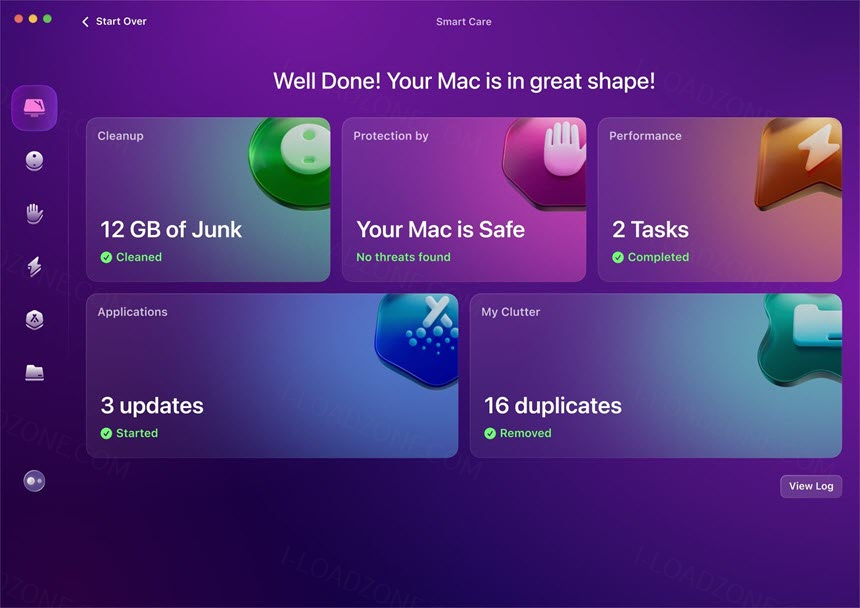
ความต้องการของระบบ (System Requirements)
If prompted: “The application “CleanMyMac” can’t be opened.”
xattr -cr /Applications/CleanMyMac_5.app
ข้อมูลไฟล์ (File Info)
License : Trial
Software Version : 5.3.0
ชื่อไฟล์ : CMM5.3.0.rar
ขนาดไฟล์ : 156 MB
นามสกุลไฟล์ : *.rar
เซิฟเวอร์ : Pixeldrain | Box
วันที่อัพโหลด : 26/12/2025
แก้ไขล่าสุด : 26/12/2025
รหัสผ่าน : sbz
โปรดระวังโฆษณาเด้งไปหน้าอื่น เช็คชื่อไฟล์, ขนาดไฟล์ ก่อนดาวน์โหลดทุกครั้ง
ดาวน์โหลด
รหัสแตกไฟล์คือ sbz
วิธีดาวน์โหลด วิธีแก้ลิ้งค์เกินโควต้า
" This file is for trial/educational and non-commercial use only. Using non-genuine software may cause various problems to use this software without any problems Please purchase a genuine license from the official website. "