Autodesk Navisworks Simulate / Manage 2020.2 โปรแกรมวิเคราะห์แบบจำลองอาคาร
ดาวน์โหลด โปรแกรม Autodesk Navisworks Simulate / Manage 2020.2 Full โปรแกรมตรวจสอบงานออกแบบสถาปัตยกรรม ฟรี

ดาวน์โหลด Autodesk Navisworks Simulate / Manage 2020.2 โปรแกรมวิเคราะห์แบบจำลองอาคาร
Autodesk Navisworks 2020 เป็นโปรแกรมสำหรับตรวจสอบงานออกแบบสถาปัตยกรรม วิศวกรรม และงานอุตสาหกรรมแบบ 3 มิติ ที่พัฒนาโดย Autodesk ช่วยเพิ่มประสิทธิภาพกระบวนการทำงานในระบบการสร้างแบบจำลองข้อมูลอาคาร หรือ BIM (Building information Modeling) ช่วยในกระบวนการวิเคราะห์แบบจำลองอาคารในรูปแบบ 4 มิติ (การวางแผนงาน) และ 5 มิติ (การถอดปริมาณงาน) โดย Navisworks แบ่งออกเป็น 3 รุ่น คือ Navisworks Freedom (รุ่นฟรี) ใช้สำหรับเปิดไฟล์ NWD และ 3D DWF, Navisworks Simulate ใช้สำหรับสร้างและแก้ไข้ข้อมูล ทำการจำลองการก่อสร้าง 5D Construction Simulation, เรนเดอร์ภาพได้ทั้งภาพนิ่งและอนิเมชั่น และการถอดปริมาณงาน , และ Navisworks Manage ใช้สำหรับการจัดการโครงการ มีคำสั่งครบสมบูรณ์ เช่นสร้างและแก้ไข้ข้อมูล, การจำลองการก่อสร้าง 5D Construction Simulation, เรนเดอร์ภาพ (ทั้งภาพนิ่งและอนิเมชั่น), การถอดปริมาณงานเหมือนกับ Navisworks Simulate แต่มีชุดคำสั้งที่เพิ่มขึ้นมา อย่างเช่น Clash Detection เหมาะสำหรับผู้รับเหมา ที่ปรึกษาโครงการ นักออกแบบ วิศวกร สถาปนิก ไปจนถึงผู้ประเมินราคาและเจ้าของงาน
คุณสมบัติเด่น (Key Features)
- Quantification
- BIM 360 Shared Views
- IFC File Reader
- Model Simulation & Analysis
- Multithread Clash Detection
- BIM Coordination
- DGN File Reader
- Project Viewing
- BIM 360 Glue Integration
- Model Review
- Quantification
- Highlighted Section Cutouts
- And more.
What’s new in Navisworks 2020
- Publish to Assemble
- BIM 360 issues integration (Preview)
- Updated IFC file reader
- New DGN file reader
- BIM 360 integration
- BIM coordination with AutoCAD, Revit, and ReCap
- Detect clashes and coordinate project models
- Supports 60+ file formats
- Aggregate data into a single model
- Model simulation and animation
- BIM 360 shared views
- Whole-team project review
- Model simulation and analysis
- Project viewing
- Quantification from PDF sheets
- Other bug fixes and improvements.
- And more.
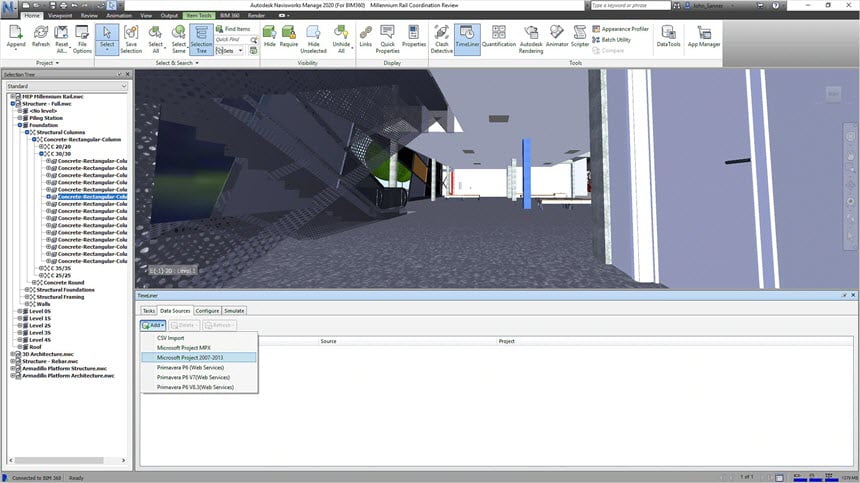
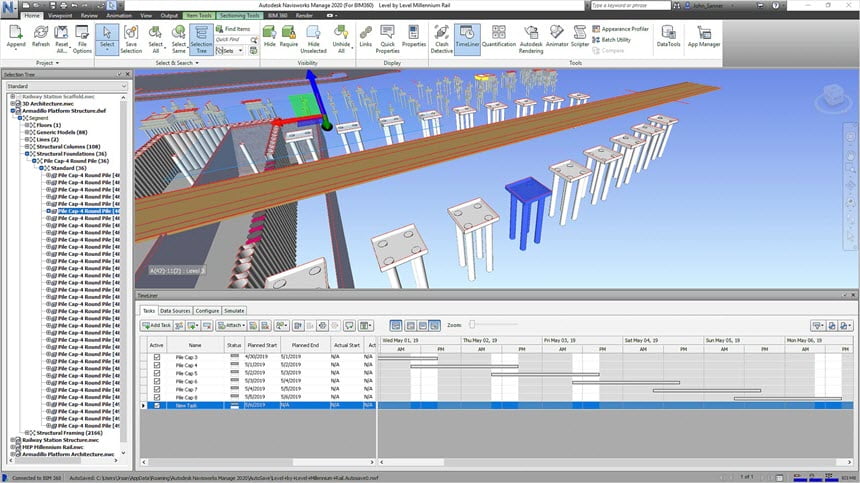
ภาพตัวอย่างโปรแกรม (Screenshots)
ความต้องการของระบบ (System Requirements)
CPU : Intel Pentium 4 or AMD Athlon 3.0 GHz (or higher) with SSE2 technology
RAM : 2 GB RAM (minimum)
HDD : 15 GB free disk space for installation
Display : 1280 x 800 VGA display with true color (1920 x 1080 monitor and 32-bit video display adapter recommended)
GPU : Direct3D 9 and OpenGL capable graphics card with Shader Model 2 (minimum)
ข้อมูลไฟล์ (File Info)
License : Trial
Software Version : 2020.2
ชื่อไฟล์ : ATD.NM.2020.2.rar ATD.NS.2020.2.x64.rar
ขนาดไฟล์ : 4.10 GB 2.85 GB
นามสกุลไฟล์ : *.rar
Server : Send.cm Google Drive
วันที่อัพโหลด : 02/02/2020
แก้ไขล่าสุด : 15/09/2022 แก้ไขลิ้งค์แล้ว
รหัสผ่าน : sbz
โปรดระวังโฆษณาเด้งไปหน้าอื่น เช็คชื่อไฟล์, ขนาดไฟล์ ก่อนดาวน์โหลดทุกครั้ง
ดาวน์โหลด
รหัสแตกไฟล์คือ sbz
วิธีดาวน์โหลด วิธีแก้ลิ้งค์เกินโควต้า
" This file is for trial/educational and non-commercial use only. Using non-genuine software may cause various problems to use this software without any problems Please purchase a genuine license from the official website. "