Astro Panel Pro 6.0.2 ปลั๊กอิน Photoshop สร้างภาพทิวทัศน์
ดาวน์โหลด โปรแกรม Astro Panel Pro 6.0.2 ปลั๊กอินสำหรับ Photoshop 2018 – 2023 ฟรี

ดาวน์โหลด Astro Panel Pro 6 ล่าสุด ปลั๊กอิน Photoshop สร้างภาพทิวทัศน์
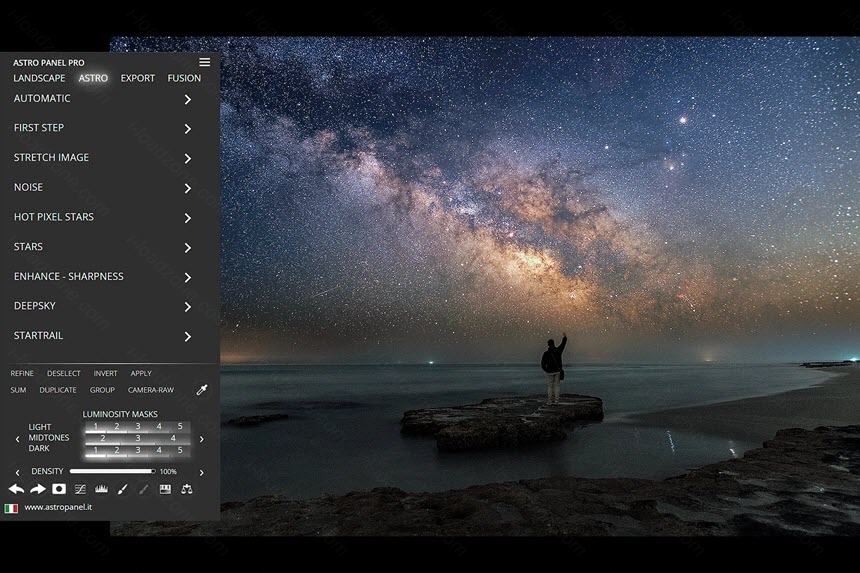
Astro Panel Pro เป็นปลั๊กอินสำหรับ Photoshop ซึ่งช่วยให้คุณสร้างภาพทิวทัศน์, ภาพทิวทัศน์เมือง, ภาพกลางคืน, ทางช้างเผือก, ภาพ Startrail และ Deep Sky ได้ง่ายขึ้น คุณจะได้เรียนรู้วิธีการแก้ไขภาพทั้งหมดของคุณ จัดการ Luminosity, Color และ Tonality Masks แบบเรียลไทม์ผ่านซอฟต์แวร์นี้และอีกมากมาย
Astro Panel จะช่วยให้คุณสามารถรวมภาพเพื่อสร้างเอฟเฟกต์ที่สวยงาม รวมภาพสำหรับ startrails ทำการซ้อนท้องฟ้าลึกด้วยวิธีที่รวดเร็วอย่างยิ่ง และด้วยอัลกอริทึมการจัดตำแหน่ง Dual Pass ที่ปฏิวัติวงการซึ่งพัฒนาขึ้นโดยเฉพาะสำหรับการจัดตำแหน่งดาว ซึ่งทำให้การจัดตำแหน่งมีความแม่นยำอย่างน่าทึ่ง และความเร็ว
คุณสามารถสร้างภาพถ่าย HDR ที่งดงามของท้องฟ้าลึกได้จากชุดภาพสามชุด ด้วยการอัปเดตล่าสุด ได้เปิดตัวการผสมภาพสำหรับการซ้อนโฟกัส, HDR แบบคลาสสิกและ HDR แบบ multi-exposure ในเวลากลางคืน ปลั๊กอินตัวนี้สามารถเข้ากันได้กับ Adobe Photoshop 2018 ถึง 2023
คุณสมบัติเด่น (Key Features)
Landscape Tools
With Astro Panel Pro you will find new features developed specifically for any type of photography. You will be able to process white balance and color tone with one click, remove digital noise and annoying hot pixels, increase image sharpness, recover shadows and highlights and manage many effects like Orton and Glow.
Astro Tools
Automatically or step by step change all the images of the milky way, deep sky or startrail. With the tools available you can enhance any detail, remove the stars in deep sky images or enhance the colors of your startrails.
Export Tools
Thanks to Astro Panel Pro you won’t waste time searching for hidden features in Adobe Photoshop CC. You will have in every tab you are using the main photographic adjustments, the brushes and the possibility of modifying in a click the opacity of the layers, the feather and the density of the brush selection mask.
Luminosity Masks
When the lights and shadows become difficult to handle, the Masks section comes in handy. This section is able to guarantee a rapid and constant workflow, allows you to select in real time all luminosity masks and is able to select all the highlights, shadows and midtones of the main colors.
Color Masks
With the Color Masks you can make the colors of your photos unique. With the real-time management of luminosity masks you can also manage the main colors. You can improve contrast, luminosity, saturation and vividness in no time by giving your photos perfect and balanced colors. Your photos will seem to come out of the monitor thanks to Astro Panel.
Quick Tools
Tools like Forward and Back, the Quick White Mask, Curve Level and Tonal Values, White Brush and Black Brush, Hue / Saturation and Color Balance have been optimized compared to the previous version.
Fusion
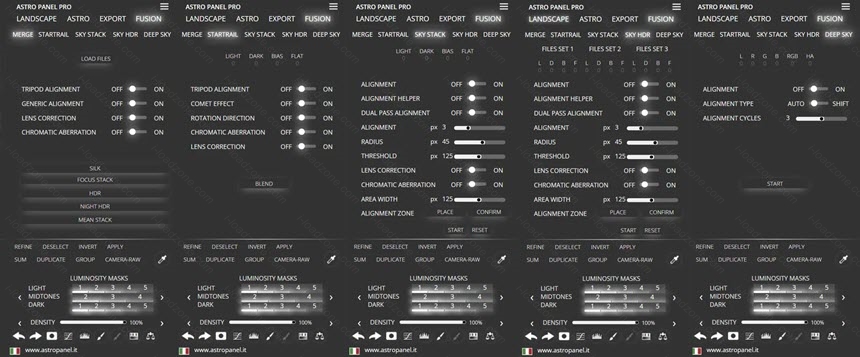
The features of Fusion make Astro Panel unique in its kind. It is a concentrate of perfect technology for merging your images in Adobe Photoshop CC. There is no plug-in for Adobe Photoshop CC that allows you to merge images.
Stacking of Astro Images
Astro Panel allows you to add images of the Milky Way and the deep sky very quickly. You can also add dark, bias and flat and have custom options for star alignment. One of the most advanced features of Astro Panel is to merge up to 3 different exposures into one to achieve a dynamic range at night without equal.
ภาพตัวอย่างโปรแกรม (Screenshots)
ความต้องการของระบบ (System Requirements)
ข้อมูลไฟล์ (File Info)
License : Trial
Software Version : 6.0.2
ชื่อไฟล์ : Astro Panel Pro 6.0.2.rar
ขนาดไฟล์ : 7.29 MB
นามสกุลไฟล์ : *.rar
Server : Send.cm Box
วันที่อัพโหลด : 26/04/2023
แก้ไขล่าสุด : 26/04/2023
รหัสผ่าน : sbz
โปรดระวังโฆษณาเด้งไปหน้าอื่น เช็คชื่อไฟล์, ขนาดไฟล์ ก่อนดาวน์โหลดทุกครั้ง
Buy
ดาวน์โหลด
รหัสแตกไฟล์คือ sbz
วิธีดาวน์โหลด วิธีแก้ลิ้งค์เกินโควต้า
" This file is for trial/educational and non-commercial use only. Using non-genuine software may cause various problems to use this software without any problems Please purchase a genuine license from the official website. "