Artstudio Pro 2.3.12 Full (macOS) โปรแกรมวาดรูป ระบายสี สำหรับ macOS ฟรี
ดาวน์โหลด โปรแกรม Artstudio Pro 2.3.12 Full (macOS) โปรแกรมวาดรูป ลงสี สำหรับ macOS ฟรี

ดาวน์โหลด Artstudio Pro 2 ล่าสุด Full (macOS) โปรแกรมวาดรูป ระบายสี สำหรับ macOS ฟรี
Artstudio Pro เป็นแอพสำหรับแต่งรูป แก้ไข และระบายสีรูปภาพที่มีประสิทธิภาพสำหรับ macOS และ iOS มีการสนับสนุน iPad Pro และ Pencil เป็นเครื่องมือแก้ไขภาพร่าง (sketching), ภาพวาด (painting), และภาพถ่ายที่ครอบคลุมที่สุดใน App Store ได้รับการออกแบบใหม่ทั้งหมดตั้งแต่ต้นจนจบ มาพร้อมกับอินเทอร์เฟซใหม่ที่สวยงามและเอ็นจิ้นกราฟิคที่ทรงพลังเพื่อให้การสร้างผลงานศิลปะเร็วขึ้น ง่ายขึ้นและสนุกมากขึ้น การใช้อัลกอริธึมการวาดขั้นสูงนี้เป็นรุ่นที่เร็วและแม่นยำที่สุดของ ArtStudio จนถึงปัจจุบัน
คุณสมบัติเด่น (Key Features)
- flexible canvas size, max: 2048×1536(iPad 1), 2592×1936 (iPad 2), 2448×3264 (iPad 3rd or newer), 3024×4032 (iPad Air2, iPad Mini 4, iPad Pro)
- support for any device orientation
- 16 tools: select, pencil, wet paintbrush, dry paintbrush, spray, dots, eraser, smudge, bucket fill, gradient, text, clone, heal, blur/sharpen, dodge/burn, eyedropper
- 450 HIGH QUALITY BRUSHES (150 free, 300 paid) divided into 30 groups
- custom brushes, max size: 500x500px
- select tool: rect/ellipse/lasso/magic wand/by color, add/sub/intersect, contract/expand/round corners/border/…
- text tool: over 150 system fonts, support of external TTF fonts (just upload .ttf file in iTunes using File Sharing), special text layer to easy edit text
- palm rejection
- favorites list to quickly access user’s favorite brush settings
- fully customizable stroke settings: blur, flip, size, opacity, spacing, fadeout, squeeze, angle, speed-size, speed-opacity, random flip, scatter, jitter-spacing, jitter-angle, jitter-size, jitter-squeeze, jitter-opacity, jitter-hue, jitter-saturation, jitter-lightness
- symmetric drawing
- guidelines, grid
- shapes: lines, rectangles, ellipses, polygons (open, closed)
- layer options: add, duplicate, merge down/visible, delete, lock alpha, show/hide, link, name, reorder, opacity,
- blending modes
- layer masks
- layer/selection transformations: move/scale/rotate with multi-touch, flip, rotate left/right, fill/erase
distort (skew, perspective etc) - 21 layer blending modes: normal, multiply, add, difference, screen, overlay, hue, saturation, color, value, …
import from ‘Camera Roll’, camera, iTunes, clipboard - export as JPG/PNG/PSD to ‘Camera Roll’, email, clipboard, iTunes
- multi-touch navigation with unlimited zoom
- undo/redo with almost infinite number of steps
- image resize (none, bilinear, bicubic, lanczos interpolations) , change canvas size, crop
- 40 filters: gaussian/motion/radial blur, sharpen, unsharp mask, add noise, render clouds, edge detect, border/vignette and more
- Elastify filter used to make incredible distortions
- adjustments: brightness/contrast/exposure, hue/saturation/lightness, color balance, temperature, shadows/highlights, CURVES, auto contrast/colors/white balance and more
- video tutorials
- And more.
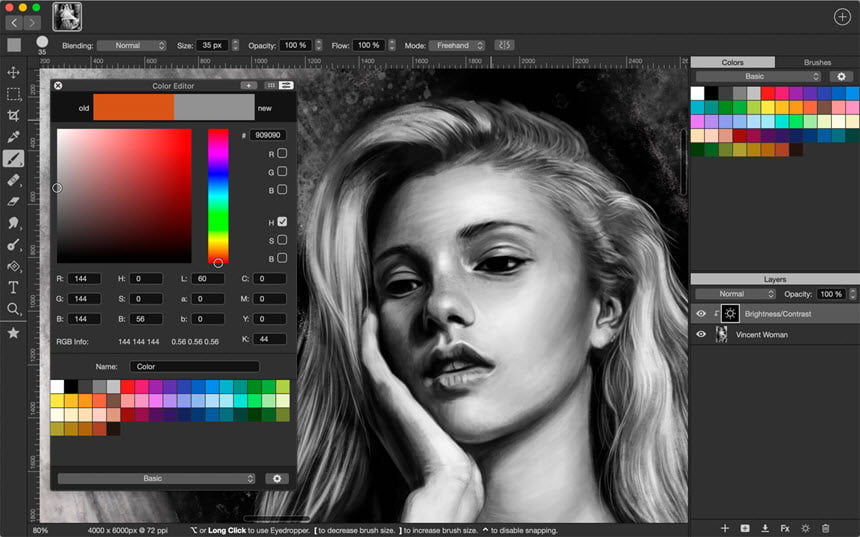
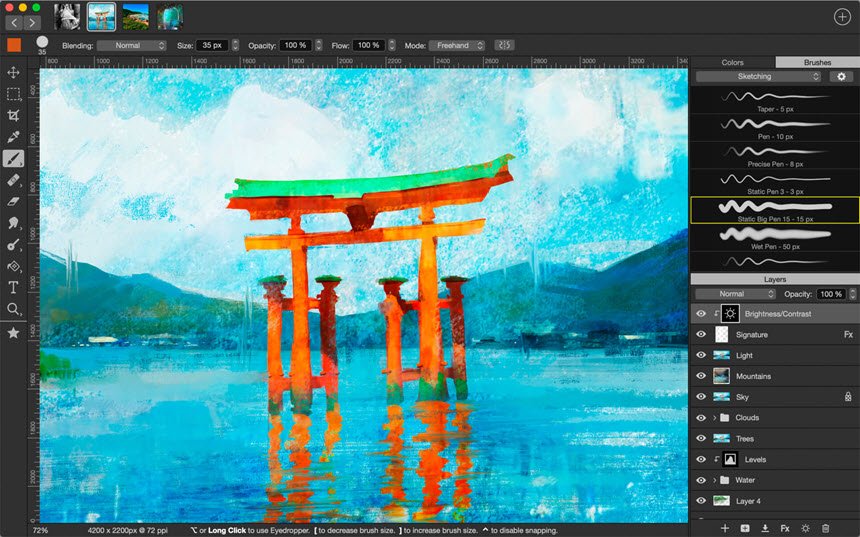
ภาพตัวอย่างโปรแกรม (Screenshots)
ความต้องการของระบบ (System Requirements)
macOS 10.11 or later 64-bit
ข้อมูลไฟล์ (File Info)
Software Version : 2.3.12
ชื่อไฟล์ : Artstudio_Pro_2.3.12_MAS__TNT.zip
ขนาดไฟล์ : 52.8 MB
นามสกุลไฟล์ : *.zip
Server : box.com
วันที่อัพโหลด : 13/01/2020
แก้ไขล่าสุด : 13/01/2020
รหัสผ่าน : sbz
ชื่อไฟล์ : Artstudio_Pro_2.3.12_MAS__TNT.zip
ขนาดไฟล์ : 52.8 MB
นามสกุลไฟล์ : *.zip
Server : box.com
วันที่อัพโหลด : 13/01/2020
แก้ไขล่าสุด : 13/01/2020
รหัสผ่าน : sbz
กำลังโหลดโฆษณา...
โปรดระวังโฆษณาเด้งไปหน้าอื่น เช็คชื่อไฟล์, ขนาดไฟล์ ก่อนดาวน์โหลดทุกครั้ง
ดาวน์โหลด
รหัสแตกไฟล์คือ sbz
วิธีดาวน์โหลด วิธีแก้ลิ้งค์เกินโควต้า
" This file is for trial/educational and non-commercial use only. Using non-genuine software may cause various problems to use this software without any problems Please purchase a genuine license from the official website. "