Adobe Bridge 2020 v10.0.0.124 จัดระเบียบไฟล์มัลติมีเดีย
ดาวน์โหลด โปรแกรม Adobe Bridge 2020 v10.0.0.124 Full โปรแกรมจัดระเบียบไฟล์มัลติมีเดีย ฟรี

ดาวน์โหลด Adobe Bridge 2020 ล่าสุด จัดระเบียบไฟล์มัลติมีเดีย
Adobe Bridge CC 2020 เป็นโปรแกรมจัดระเบียบไฟล์มัลติมีเดีย ที่นิยมใช้กันมากที่สุดโดยเหล่าสาวก Adobe เนื่องจากเป็นโปรแกรมที่ใช้งานง่าย เหมาะสำหรับการจัดระเบียบไฟล์โดยการเปลี่ยนชื่อกลุ่มใหม่พร้อมกัน กำหนดป้ายกำกับสี หรือการให้คะแนนดาวที่กำหนดให้กับไฟล์จากชุดซอฟต์แวร์ Adobe ที่เกี่ยวข้อง
Adobe Bridge CC สามารถแก้ไขข้อมูลเมตาของแบบจำลองข้อมูล XMP และ IPTC Interchange Model หรือจัดประเภทข้อมูลเหล่านั้น โดยขึ้นอยู่กับข้อมูลเมตาของตน สามารถใช้ตัวเลือกเหล่านี้ผ่านทางเวอร์ชันต่างๆ ของไฟล์ที่เป็นส่วนหนึ่งของโครงการ Adobe Version Cue
คุณสมบัติเด่น (Key Features)
- Bulk import, export and preview CC Libraries assets
- Edit photo capture time
- Export/ Import network cache
- Native PDF Output Module
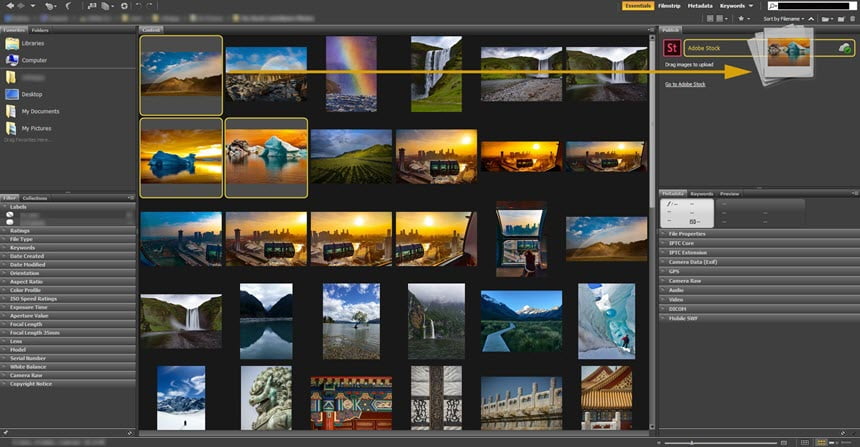
- Easy upload of images to Adobe Stock so you can get royalties for your work
- Support for Retina and HiDPI displays with the ability to scale
- Automated cache management
- Publishing to Adobe Portfolio to build your personalized website
- Quick organization and stacking of panoramic and HDR images
- On-demand thumbnail and metadata generation
- Option to import photos and videos from your mobile device or digital camera on macOS
- Support for CEP HTML5
- Flexible batch processing
- Drag-and-drop file flexibility
- Centralized color settings
- And more.
What’s new in Bridge CC 2020 ?:
- Publishing resources in Adobe Portfolio
- Built-in “Output” workspace for creating PDF checklists
- UI improvements in the workflow “Publish to Adobe Stock”
- New filtering criteria in the Filter panel
- Improved File Info Dialog Box
- CEP extension support
- Improved scrolling
- Other bug fixes and improvements.
ภาพตัวอย่างโปรแกรม (Screenshots)
ความต้องการของระบบ (System Requirements)
Windows 7/ 8/ 8.1/ 10 (64-bit – all editions)
CPU : Intel Core2 Duo or AMD Athlon 64 processor; 2 GHz or faster processor
RAM : 2 GB of RAM (8 GB recommended)
HDD : 5 GB+
Display : 1024×768 display (1280×800 recommended) display with 16-bit color
OpenGL 2.0–capable system
CPU : Intel Core2 Duo or AMD Athlon 64 processor; 2 GHz or faster processor
RAM : 2 GB of RAM (8 GB recommended)
HDD : 5 GB+
Display : 1024×768 display (1280×800 recommended) display with 16-bit color
OpenGL 2.0–capable system
ข้อมูลไฟล์ (File Info)
Official Website : www.adobe.com
License : Trial
Software Version : 10.0.0.124
ชื่อไฟล์ : ADB.BR.2020.v10.0.0.124.Pre-Act.rar
ขนาดไฟล์ : 1.01 GB
นามสกุลไฟล์ : *.rar
Server : Google Drive
วันที่อัพโหลด : 24/10/2019
แก้ไขล่าสุด : 06/04/2024 แก้ไขลิ้งค์แล้ว
รหัสผ่าน : sbz
License : Trial
Software Version : 10.0.0.124
ชื่อไฟล์ : ADB.BR.2020.v10.0.0.124.Pre-Act.rar
ขนาดไฟล์ : 1.01 GB
นามสกุลไฟล์ : *.rar
Server : Google Drive
วันที่อัพโหลด : 24/10/2019
แก้ไขล่าสุด : 06/04/2024 แก้ไขลิ้งค์แล้ว
รหัสผ่าน : sbz
กำลังโหลดโฆษณา...
โปรดระวังโฆษณาเด้งไปหน้าอื่น เช็คชื่อไฟล์, ขนาดไฟล์ ก่อนดาวน์โหลดทุกครั้ง
ดาวน์โหลด
รหัสแตกไฟล์คือ sbz
วิธีดาวน์โหลด วิธีแก้ลิ้งค์เกินโควต้า
" This file is for trial/educational and non-commercial use only. Using non-genuine software may cause various problems to use this software without any problems Please purchase a genuine license from the official website. "