10-Strike LANState Pro 10.5 โปรแกรมมอนิเตอร์เครือข่าย
ดาวน์โหลด โปรแกรม 10-Strike LANState Pro 10.5 โปรแกรมมอนิเตอร์เครือข่ายและอุปกรณ์ LAN แบบมืออาชีพ ฟรี

ดาวน์โหลด 10-Strike LANState Pro 10.5 โปรแกรมมอนิเตอร์เครือข่าย
10-Strike LANState Pro คือโปรแกรมสำหรับตรวจสอบและมอนิเตอร์เครือข่ายภายใน (LAN Monitoring) ที่ช่วยให้ผู้ดูแลระบบสามารถดูสถานะของคอมพิวเตอร์ เซิร์ฟเวอร์ เราเตอร์ สวิตช์ และอุปกรณ์เครือข่ายต่างๆ ได้แบบเรียลไทม์ โปรแกรมเหมาะสำหรับองค์กร สำนักงาน โรงเรียน หรือผู้ดูแลระบบที่ต้องการควบคุมเครือข่ายให้มีความเสถียร ลดปัญหาเครื่องล่ม หรืออุปกรณ์ออฟไลน์โดยไม่รู้ตัว
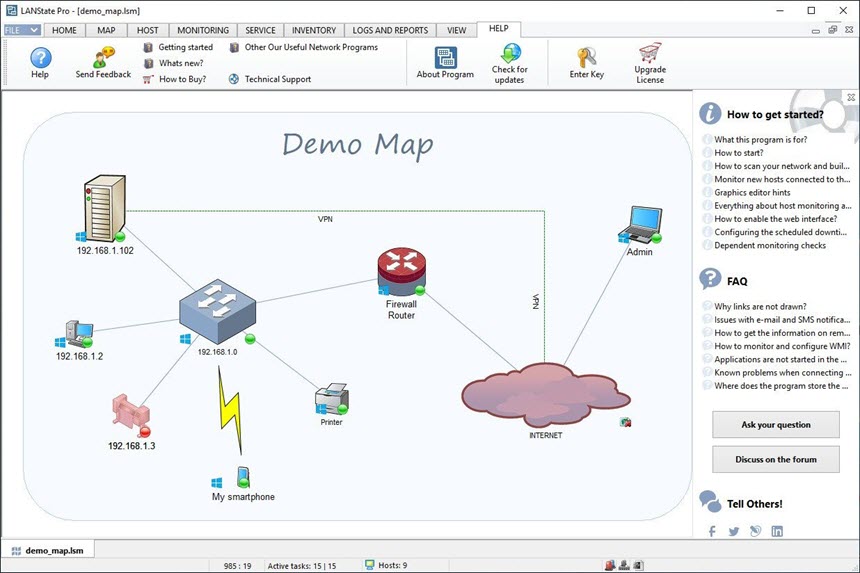
จุดเด่นของ 10-Strike LANState Pro คือการแสดงผลสถานะเครือข่ายในรูปแบบแผนผัง (Network Map) ที่เข้าใจง่าย ผู้ใช้สามารถตรวจสอบการเชื่อมต่อผ่าน Ping, SNMP, TCP, HTTP และบริการเครือข่ายอื่นๆ ได้อย่างละเอียด พร้อมระบบแจ้งเตือนเมื่ออุปกรณ์มีปัญหา เช่น เครื่องดับ การเชื่อมต่อขาด หรือค่าการทำงานผิดปกติ ช่วยให้แก้ไขปัญหาได้รวดเร็ว ลด Downtime ของระบบ
หากคุณกำลังมองหาโปรแกรม PC สำหรับบริหารจัดการและตรวจสอบระบบเครือข่าย LAN อย่างจริงจัง 10-Strike LANState Pro เป็นตัวเลือกที่ตอบโจทย์ ด้วยอินเทอร์เฟซที่ใช้งานง่าย ตั้งค่าไม่ซับซ้อน แต่ให้ความสามารถระดับมืออาชีพ เหมาะทั้งผู้ดูแลระบบ IT และองค์กรที่ต้องการความมั่นคงและความพร้อมใช้งานของเครือข่ายตลอดเวลา
คุณสมบัติเด่น (Key Features)
- All network administrators like to informed at all times about the status of the devices they are in charge with, so rather than walking to each of them to check them up, they can rely on a dedicated software solution that can centralize all the information. Such an application is 10-Strike LANState.
- Considering that efficiently using this utility means scanning the network according to the settings specified by users, they need to have some previous knowledge of networking otherwise they might not get access to all the devices they were looking for.
- 10-Strike LANState comes with a sample file that can help users get accustomed to the ways used by the app for mapping devices and they can also get an idea regarding the correct method of mapping them.
- When they want to create a new map from scratch, users can either import individual hosts or they can scan an IP range and import all the detected devices, be they workstations, printers, routers, servers, laptops, firewalls, switches, access points and so on. Once mapped, users can easily check their status by regularly pinging them.
- If the generated map does not come with a correct layout (depending on their existing network settings), users can manually add lines and areas, so as to organize their devices more efficiently.
- In addition, users can also explore a wide range of information about the monitored device – for example, in the case of workstations, the application can display the IP address, the DNS name and MAC address, the running OS, current date and time, as well as uptime or even Ethernet card vendor.
- Admins can also perform other tasks on the mapped devices, including sending them messages, running traceroute or name lookup, remotely shutting them down or creating detailed reports that can be analyzed at a later time.
ภาพตัวอย่างโปรแกรม (Screenshots)
ความต้องการของระบบ (System Requirements)
ข้อมูลไฟล์ (File Info)
License : Trial
Software Version : 10.5
ชื่อไฟล์ : 10-SLANSP10.5.rar
ขนาดไฟล์ : 84.8 MB
นามสกุลไฟล์ : *.rar
เซิฟเวอร์ : Pixeldrain | Box
วันที่อัพโหลด : 29/12/2025
แก้ไขล่าสุด : 29/12/2025
รหัสผ่าน : sbz
โปรดระวังโฆษณาเด้งไปหน้าอื่น เช็คชื่อไฟล์, ขนาดไฟล์ ก่อนดาวน์โหลดทุกครั้ง
ดาวน์โหลด
รหัสแตกไฟล์คือ sbz
วิธีดาวน์โหลด วิธีแก้ลิ้งค์เกินโควต้า
" This file is for trial/educational and non-commercial use only. Using non-genuine software may cause various problems to use this software without any problems Please purchase a genuine license from the official website. "